In this guide
- A core update re-ranks sites against each other, it doesn’t penalize pages
- Recovery depends on which update hit you
- The diagnosis: five steps in Search Console before any content change
- How long recovery takes, by update type
- What not to do in the first month
- Build it with AI: an update diagnosis agent
- What stopped being true
- Pulling it all together
- FAQ
- In a nutshell
“These changes are broad in nature, and don’t target specific sites or individual web pages.”
Google Search Central, Google Search’s core updates and your website (last updated 10 Dec 2025)
Clicks stepped down in the same week as a core update, and someone wants a plan by Friday. The checklist you found says to rewrite your weakest pages, add author bios and refresh dates. Google released the November 2026 core update on 10 Nov 2026 and said the rollout “may take up to 2 weeks”. As of 20 Nov 2026 the dashboard had not marked it complete, so plenty of teams are in exactly that spot right now.
A core update re-ranks the list. It doesn’t fine your pages. Google compares it to a friend’s top-20 restaurant list being redone: the places that drop “aren’t necessarily bad”, others made the list. That is one cause of a drop. A spam update, a manual action, a Discover update, a broken template, a reporting glitch or an AI Overview can draw the same graph, and each one recovers on a different clock.
So this guide diagnoses first and recovers second. The table below routes you to the right cause, five steps in Search Console confirm it, and each update type then gets its own recovery path, with Google’s dated wording as the timeline.
| Cause | What you see in Search Console and on the dashboard | First move | Recovery clock (Google’s wording) |
|---|---|---|---|
| Broad core update | Drop starts inside a core update window on the Search Status Dashboard. Impressions and clicks fall together. Many queries lose several positions at once | Wait until the rollout ends plus a full week, then compare before and after | Days to “several months”, possibly “the next core update”, no guarantee |
| Spam update | Drop inside a spam update window. Can be a step change, pages moving to “Crawled, currently not indexed” | Review the spam policies against your templates and links | “Over a period of months” |
| Link spam | Gradual or step loss on pages that relied on bought or swapped links | Stop the practice. Disavow only if a manual action is likely | Lost link credit “cannot be regained” |
| Manual action | A notice in the Manual actions report and the message center | Fix every affected page, then Request Review | Review takes “several days or weeks” |
| Discover update | Discover report falls, Search results report flat | Read Discover separately, apply core guidance | As core |
| Technical or security | Spike in Page indexing or Crawl stats errors, or a Security issues notice | Fix the break, then recheck indexing | After recrawl |
| Reporting or tracking artifact | One report moves, the others don’t, or a Data anomalies entry covers the dates | Annotate it. Change nothing on the site | None needed |
| Clicks-only loss | Impressions and position flat, clicks down | Check the SERP for AI Overviews and rich results | Not a ranking problem |
| Seasonality or demand | The same dip in the same month last year, confirmed in Google Trends | Compare year over year | Returns with demand |
How we know
Sources: Google Search Central’s core updates, spam updates and traffic-drop debugging pages (all last updated 10 Dec 2025), Search Console Help (Manual actions, Performance report, Data anomalies, bulk data export), the Search Analytics API reference (updated 16 Nov 2026) and the Google Search Status Dashboard, each read on 19 Nov 2026.
Studies: SE Ranking’s 100,000-keyword tracking of the March 2026 updates (17 Apr 2026) and Amsive’s analysis of 2,076 domains from SISTRIX winner and loser lists (30 Apr 2026).
First-party: one labeled example from a site I led, n=1, with the update it followed still unknown.
The limit: nobody has published how often hit sites recover, by update type or by fix. Google documents the mechanics, not the odds.
Quick Digest
Confirm the cause first: a core update, a spam update, a manual action, a technical break and a tracking glitch can all look the same in a traffic graph.
The November 2026 core update began on 10 Nov 2026. Google asks you to wait a full week after it completes before analyzing.
Compare winners and losers by template and intent, not page by page.
Each update type recovers differently: core in months or at a later core update, spam over months, link spam credit never, manual actions after a review.
Deleting content is “a last resort” by Google’s own wording.
An AI agent can run the comparison read-only, before anyone edits a page.
A core update re-ranks sites against each other, it doesn’t penalize pages
“If you suspect a drop in traffic is due to an algorithmic update, it’s important to understand that there might not be anything fundamentally wrong with your content.”
Google Search Central, Debugging drops in Google Search traffic (last updated 10 Dec 2025)
A core update changes how Google ranks everything, so your loss is someone else’s gain on the same list. Google’s core updates page says core updates “don’t target specific sites or individual web pages” and asks you to look at the site “as a whole”. That is why page-level checklists can miss. The page you rewrite may have done nothing wrong. It was outranked.
The cadence is steady, and the rollouts vary in length. By count from the Search Status Dashboard, Google announced three core updates in 2025 (13 Mar, 30 Jun, 11 Dec) and three so far in 2026 (27 Mar, 21 May and 10 Nov). Rollouts have run from 6 days 4 hours (Dec 2024) to 45 days (Mar 2024). Google also runs smaller core updates it does not announce, which is why improvement can show between the named ones. The dated history lives on the Google update timeline.
The unit of change is often a type of site, not a page. In Amsive’s analysis of 2,076 domains drawn from SISTRIX’s winner and loser lists for the March 2026 core update (27 Mar to 8 Apr 2026, published 30 Apr 2026), losses clustered among platforms that host or discuss other people’s content, with YouTube down about 567 visibility points, while brand-owned, government and original sources gained. Amsive’s own caveat is that SISTRIX measures keyword visibility, not traffic, and the analysis does not show why. Here’s the useful part: if you run the aggregator in your niche, the comparison that matters is with the owner of the thing you write about.
The helpful content system no longer runs on its own. Google folded it into core ranking in March 2024, and the last named helpful content update began on 14 Sep 2023. There is no separate “HCU recovery” to plan for. It is core-update recovery.
For a B2B site whose loss sits on a handful of commercial and comparison pages, the comparison in step 4 is small and fast. For a B2C publisher with thousands of informational pages, the loss can spread across templates, and the grouping does most of the work.
So read the drop as a re-ranking.
Quick Summary
Q: Is a Google core update a penalty?
A: No. Google describes core updates as broad changes that don’t target specific sites or pages. Pages that drop may be fine and simply outranked by pages Google now judges more helpful, so recovery starts by comparing what lost with what won.
Insight
“The list will change, and restaurants that move down aren’t necessarily “bad”; there are just other restaurants that make your top 20.”
Google Search Central, Google Search’s core updates and your website (last updated 10 Dec 2025)
Recovery depends on which update hit you
“Making changes may help a site improve if our automated systems learn over a period of months that the site complies with our spam policies.”
Google Search Central, Google Search spam updates and your site (last updated 10 Dec 2025)
Recovery is not one process. Google runs core updates, spam updates, link spam updates, Discover updates and human manual actions, and each has its own fix and its own clock. Match the drop date to the update type before you choose a fix.
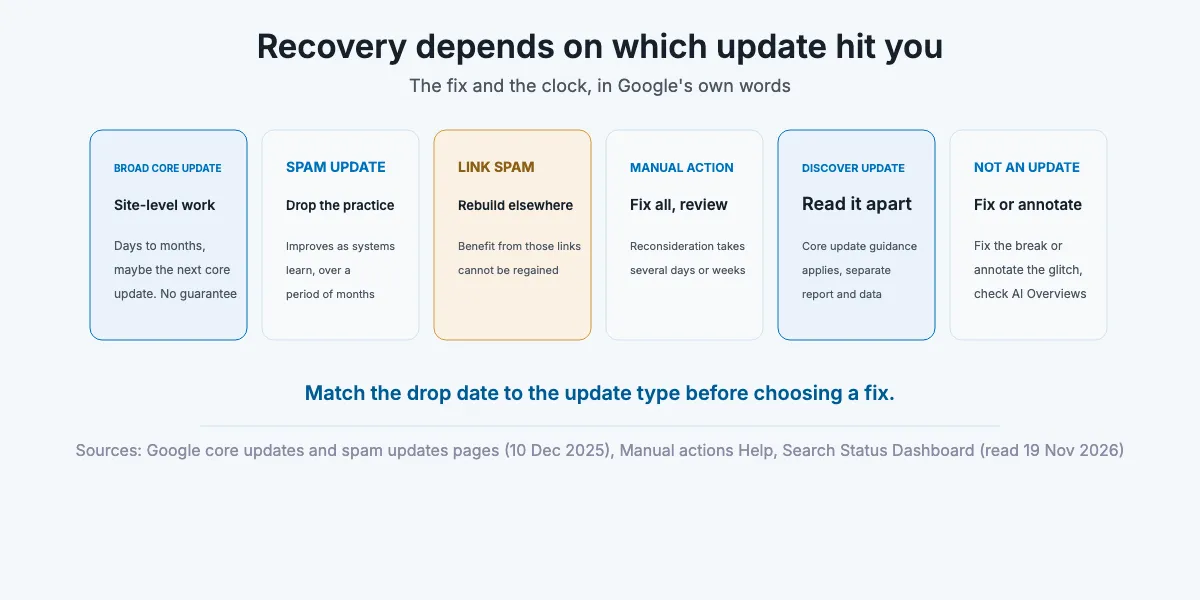
Broad core update
The fix is site-level and comparative. Google’s core updates page tells you to evaluate “the pages that were most impacted” against the self-assessment questions and notes “there may be other pages on the web that are doing a better job of helping the searcher”. The work is closing that gap on the page groups that lost, which step 4 and step 5 below cover. Expect months, and expect no guarantee.
Spam update
A spam update needs a policy answer first, not a content answer. Read Google’s spam policies against how your pages are made and linked, starting from its spam updates page. The named policies that fit a sitewide step change best are scaled content abuse (many pages made primarily to manipulate rankings, however they are produced), site reputation abuse (third-party pages riding on a host’s signals) and expired domain abuse (a bought domain repurposed for rankings). Remove the practice, not just the worst pages. If you published pages at scale from templates or AI drafts, start there. Google says improvement may come once its systems “learn over a period of months” that the site complies.
Don’t expect the next core update to undo a spam hit. In SE Ranking’s tracking of 100,000 keywords across 20 niches from New York (published 17 Apr 2026), about 302,000 domains dropped out of the top 100 after the March 2026 spam update, and 82% had not returned once the core update that followed had finished. SE Ranking’s own caveat is that the two updates overlapped, so it is “not possible to say with complete certainty” which caused each change, and the window was weeks, not months.
Link spam update
Credit from manipulative links is gone for good. Google’s spam updates page says that when its systems remove the effect of spammy links, “Any potential ranking benefits generated by those links cannot be regained.” Recovery here means earning the rankings again by other means, which the off-page SEO guide covers. Disavow only if you have many spammy links that caused, or will likely cause, a manual action. Google says most sites will never need the tool.
Manual action
A manual action is the one case with a notice and a form. Open the Manual actions report. It names the issue and whether it affects “a subset of your site, or the entire site”. Fix every listed page, then use Request Review and explain the issue, what you changed and the result. If you see no notice in that report, it isn’t a manual action. Partial fixes earn nothing, and Google says “Most reconsideration reviews can take several days or weeks.”
Discover update
Discover has its own updates and its own report. Google released a “February 2026 Discover core update” for English-language users in the US, from 5 to 27 Feb 2026, and said its general core update guidance applies. Discover traffic does not appear in the Search results report, and the Search Console API treats it as a separate search type. If you see only Discover fall, your search rankings may be fine.
Not an update at all
Rule these out before you blame Google. Google’s traffic-drop debugging guide lists technical, security, spam, seasonality and site-move causes next to algorithm updates. A misplaced noindex or a template change produces a slower drop that the Page indexing and Crawl stats reports show (the technical SEO guide covers the fixes). A reporting artifact moves one report and not the others. Search Console’s Data anomalies page lists a logging error that reduced impressions in the Generative AI report from 9 to 11 Nov 2026, the same days the November core update started. Desktop impressions fell and average position rose in mid-September 2025 when Google stopped supporting the 100-results parameter, and several rank-tracking vendors said in October 2026 that some of the Google results they collect were inaccurate. If impressions held and clicks fell, look at the results page. In Ahrefs’ analysis of 300,000 keywords, the position-one page on keywords with an AI Overview got a click-through rate about 58% below forecast in December 2025, a forecast modeled from December 2023 (published 4 Feb 2026, desktop data, correlational). The GEO guide covers that branch.
Not sure which
When a spam update and a core update overlap, fix what would be wrong under both. In March 2026 the spam update started on 24 Mar and the core update on 27 Mar, so no traffic graph can separate them. In one large legal-services site I led (Zolvit, 500K+ pages, Jul to Dec 2024), we never established whether a core or a spam update had hit it. We deleted thin pages first, moved a whole judgments section to a separate domain, then held new content to a stricter bar, and monthly organic visits went from about 400K to about 700K in six months [FIRST-PARTY, n=1]. That was one site, one team and one period. It shows the order of work, not a result you should expect.
Quick Summary
Q: Does recovery work the same way for every Google update?
A: No. Core updates need site-level improvement and can take months. Spam updates need the violating practice removed and also take months. Link spam credit cannot be regained. Manual actions need every listed issue fixed and a review request. Discover updates show only in the Discover report.
Insight
“In the case of a link spam update (an update that specifically deals with link spam), making changes might not generate an improvement.”
Google Search Central, Google Search spam updates and your site (last updated 10 Dec 2025)
So the work starts in Search Console, not in the CMS.
The diagnosis: five steps in Search Console before any content change
“We recommend waiting at least a full week after a core update completes before analyzing your site in Search Console.”
Google Search Central, Google Search’s core updates and your website (last updated 10 Dec 2025)
Five steps, one week, no edits until step 5. Each step names the report to open first and the condition under which you can skip it.
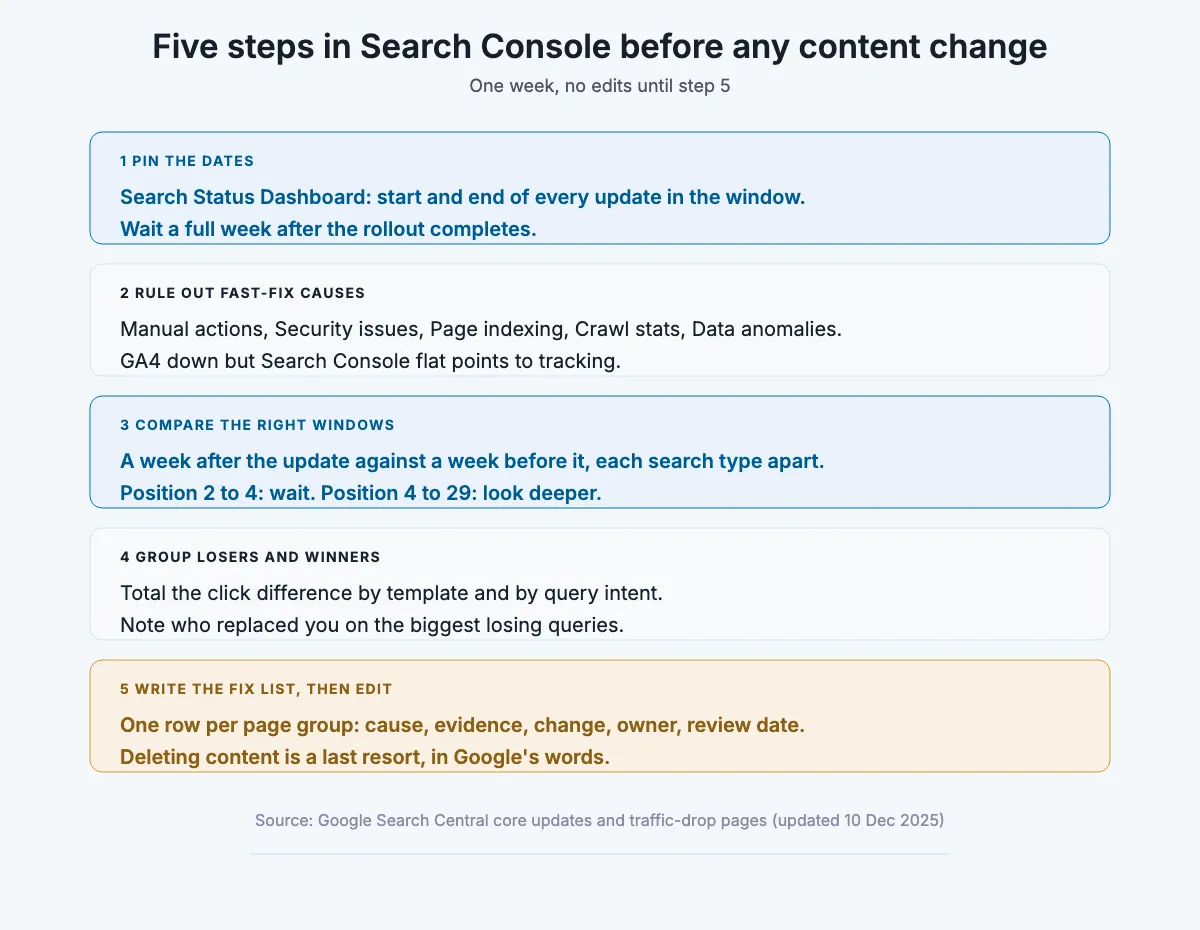
Step 1: Pin the drop to the Search Status Dashboard
First action: open the Search Status Dashboard and write down the start and end of every update inside your drop window. For the November 2026 core update, wait for the completion note, then add 7 days before you compare. Skip the wait only when you find a manual action or a technical break in step 2, because those don’t depend on the rollout.
- Did the drop start inside an update window, or before it?
- Did two updates overlap, as the March 2026 spam and core updates did?
- Is the update still marked as rolling out?
Write the dates down first.
Step 2: Rule out the fast-fix causes
First action: open Manual actions, Security issues, Page indexing and Crawl stats in Search Console, then the Data anomalies page. If you see GA4 drop while Search Console holds, suspect tracking, not ranking. The SEO audit checklist has the full list of checks if you need to go wider.
- Any manual action or security notice?
- A spike in “not indexed” or server errors around the drop date?
- A logged anomaly covering your dates?
- Did a release, migration or template change ship the same week?
Rule these out in an hour.
Step 3: Compare the right windows, and split clicks, impressions and position
First action: in the Performance report, compare the first full week starting 7 days after the rollout ended with the week before it began, as Google’s core updates page suggests. Read each search type on its own (Web: text-based, Web: multimodal, Image, Video, News), and read Discover in its own report. Google’s own split is the threshold: a slip from position 2 to 4 needs “no drastic action”, while a fall from 4 to 29 needs “a deeper assessment”.
- Did impressions and clicks fall together, or clicks alone?
- Is the loss in one country or device, or everywhere?
- Do the losing queries share an intent?
Small slips mean wait.
Step 4: Group what lost and what won by template and intent
First action: export pages and queries for both windows. The UI is enough when you have a few hundred pages. The Search Analytics API returns up to 25,000 rows per request with paging and regex filters, and bulk data export sends daily data to BigQuery without the row limit (from the day you set it up). Tag each URL with its template by path pattern (/blog/, /compare/, /product/, /location/) and each query with its intent (informational, comparison, transactional, navigational), then total the click difference per group. Then open the current top results for your biggest losing queries and note who replaced you. That is the new list, and the comparison Google asks for.
- Which template lost the most clicks, in absolute terms?
- Did any template gain?
- Are the sites that replaced you the same type as yours, or owners, forums or AI answers?
Losers and winners, side by side.
Step 5: Write the fix list, then change only what the comparison supports
First action: write one row per losing page group: suspected cause, evidence from steps 3 and 4, the change, an owner and a review date. Use Google’s self-assessment questions on the group, not on one URL. Google warns against “quick fix” changes, and calls deleting content “a last resort”. The condition matters here: if a whole section exists mainly to rank, removing it can help the rest of the site, and Google says so. For a small site with thin but unique pages, improve them before you cut anything, unless they break a spam policy.
- Could a competitor publish a near-identical page tomorrow?
- Does the page answer the query better than the page that replaced it?
- Who owns the fix, and when will you check it?
Then, and only then, edit.
Quick Summary
Q: How do you check whether a core update hurt your site?
A: Confirm the update window on the Search Status Dashboard, wait a full week after it completes, rule out manual actions, technical breaks and reporting glitches, then compare a week after the update with a week before it in Search Console. Group the pages and queries that lost and won by template and intent before changing anything.
Insight
“If both impressions and clicks dropped, check the list of the most common reasons that could have caused it. If your impressions remain the same but your clicks drop, you might not be generating the best page title and snippet that you could, and so users don’t understand the content of your page, or perhaps other sites had a more appealing rich result.”
Google Search Central, Debugging drops in Google Search traffic (last updated 10 Dec 2025)
How long recovery takes, by update type
“If it’s been a few months and you still haven’t seen any effect, that could mean waiting until the next core update.”
Google Search Central, Google Search’s core updates and your website (last updated 10 Dec 2025)
Google gives ranges, not dates, and nobody has published a recovery rate. Use Google’s own words with leadership, by update type.
| Update type | What Google says (page, last updated) | The sentence for leadership |
|---|---|---|
| Broad core | “some changes can take effect in a few days, but it could take several months”. Smaller unannounced core updates can show it. “No guarantee” (core updates, 10 Dec 2025) | “We expect movement over months, possibly at the next core update, and Google guarantees none” |
| Spam | Improvement may come as systems “learn over a period of months” (spam updates, 10 Dec 2025) | “Months after the practice is gone” |
| Link spam | Benefits “cannot be regained” (spam updates, 10 Dec 2025) | “That traffic was rented. We rebuild it another way” |
| Manual action | “Most reconsideration reviews can take several days or weeks” (Manual actions Help, read 19 Nov 2026) | “Weeks for the review, once every page is fixed” |
| Site move (a look-alike) | “a medium-sized website can take a few weeks” (debugging page, 10 Dec 2025) | “Weeks, while Google recrawls” |
The next named core update is not predictable. Google announced three in 2025 and three so far in 2026, and the gaps between named core updates ran from under two months to almost six, but it publishes no schedule. If you report to a board, plan the quarter on the assumption that nothing returns until the work is done and a later update has run.
That is the honest timeline.
Quick Summary
Q: How long does it take to recover from a Google core update?
A: Google says some changes take effect in a few days, others take several months, and if nothing has moved after a few months recovery may wait for the next core update. It guarantees no recovery, and no public dataset gives a recovery rate.
Insight
“However, you don’t necessarily have to wait for a major core update to see the effect of your improvements. We’re continually making updates to our search algorithms, including smaller core updates. These updates are not announced because they aren’t widely noticeable, but they are another way that your content can see a rise in position (if you’ve made improvements).”
Google Search Central, Google Search’s core updates and your website (last updated 10 Dec 2025)
What not to do in the first month
“Deleting content is a last resort, and only to be considered if you think the content can’t be salvaged.”
Google Search Central, Google Search’s core updates and your website (last updated 10 Dec 2025)
Hold the reflexes until the diagnosis asks for them. Six to skip:
- Changing dates without changing content. Google’s helpful content page (updated 5 Oct 2026) lists it as a search engine-first sign.
- Deleting or noindexing whole sections by default. It is “a last resort” unless the section exists mainly to rank.
- Disavowing as a ritual. Google says most sites will never need the tool.
- Adding author bios as the fix. Google says E-E-A-T “isn’t a specific ranking factor” (helpful content page, 5 Oct 2026).
- Acting on unconfirmed volatility. The dashboard lists announced updates. A tracker spike with no entry is unconfirmed.
- Reporting a tracker drop as a ranking drop. Check Search Console first, especially after the October 2026 tracker incident.
Unless your diagnosis points at one of these, none of them is a recovery step. Fewer changes, made for a reason.
Quick Summary
Q: What should you avoid after a Google core update?
A: Avoid refreshing dates without real changes, mass-deleting content, disavowing links by default, cosmetic author-bio edits and acting on unconfirmed volatility. Google calls deletion a last resort and says date changes without substantial change are a search engine-first sign.
Insight
“Are you adding a lot of new content or removing a lot of older content primarily because you believe it will help your search rankings overall by somehow making your site seem “fresh?” (No, it won’t)”
Google Search Central, Creating helpful, reliable, people-first content (last updated 5 Oct 2026)
Build it with AI
Build it with AI: an update diagnosis agent
“Silent failure is the default failure mode, and I know exactly what it costs.”
Frederick Vallaeys, co-founder of Optmyzr, in Search Engine Journal (2 Sep 2026)
An agent can run steps 3 and 4 after every update and hand you a fix list in an hour of review. It reads Search Console and crawl data, groups winners and losers by template and intent, and writes a draft fix list. It never edits a page.
Which route fits depends on site size and budget, because there is no official Search Console MCP server. Google’s managed MCP product list (read 19 Nov 2026) includes BigQuery and Workspace servers but not Search Console, Google Analytics or Google Ads, and the Search Console API pages do not mention MCP. So there are two honest routes.
- Official route (best for sites with tens of thousands of pages): turn on Search Console bulk data export to BigQuery, then connect Google’s managed BigQuery MCP server (endpoint bigquery.googleapis.com/mcp). Give the agent’s account the MCP Tool User, BigQuery Job User and BigQuery Data Viewer roles, and allow only the execute_sql_readonly tool. Google’s documentation says execute_sql is the only BigQuery MCP tool that isn’t read-only. Export history starts the day you set it up, so turn it on before you need it.
- Community route (fine for smaller sites): a community Search Console MCP server such as ahonn/mcp-server-gsc (MIT license, one search_analytics tool, regex filters, up to 25,000 rows) running under a service account. Its README has you add that account to the property as an administrator, so treat the key as a write-capable credential. It is not Google’s code, so pin a reviewed version and keep its key away from anything that can write.
- Crawl data: a headless crawl export. Screaming Frog’s SEO Spider runs from the command line with —crawl, —headless and —export-tabs, and writes files the agent reads. It has no MCP server, so files are the interface.
- The model: Claude Code runs non-interactively with claude -p, loads servers with —mcp-config and limits tools with —allowedTools. OpenAI’s Responses API takes a remote MCP server as an mcp tool with allowed_tools and require_approval. xAI’s Grok API takes remote MCP tools with server_url and allowed_tools over Streaming HTTP or SSE. Pick the one your budget already covers.
The prompt (paste and adjust)
You are diagnosing a Google traffic drop. Do not suggest content edits until the comparison is done.
Read the update dates I give you. Compare clicks, impressions and average position for the week starting 7 days after the rollout ended against the week before it began, by page and by query, web search only.
Assign every URL a template from these path patterns: [list]. Assign every query an intent: informational, comparison, transactional or navigational.
Total the click difference per template and per intent. List the 10 page groups with the largest absolute loss and any group that gained.
From the crawl export, flag indexability changes, status codes and noindex tags on the losing groups.
Output a table: page group, clicks before, clicks after, change, likely cause (core, spam, technical, tracking, clicks-only), evidence, suggested next check. Mark anything you inferred as an inference. Quote no number you did not read from the data.
Schedule: run it once 7 days after each core or spam update completes, and weekly in between for early warning. A cron job calling claude -p with —permission-prompts none works for an unattended run, because Claude Code’s own docs name it for scheduled jobs. Human checkpoint: the SEO lead reviews the table against Search Console before anything goes on the fix list, and every change still goes through step 5. Failure alert: check the BigQuery ExportLog table or the script’s exit code, because an empty export looks like a perfect week.
Limits to plan for: the Search Console API allows 1,200 Search Analytics queries a minute per site, and the MCP specification warns that servers run with the same privileges as the client, so local servers get the least access you can give them. Benchmarks keep the human in the loop too. On AD-Bench (version 2, Jun 2026), the best model answered 76.9% of real advertising-analytics questions correctly on the first try and 61.4% on the hardest tier.
Read-only, every time.
Quick Summary
Q: Can AI diagnose a Google core update drop?
A: It can run the comparison. A read-only agent connected to Search Console data (through bulk export and Google’s BigQuery MCP server, or a reviewed community Search Console server) and a crawl export can group losing and winning pages by template and intent and draft a fix list. A person still confirms the diagnosis before any change.
Insight
The MCP specification is blunt about credentials: “MCP servers MUST NOT accept any tokens that were not explicitly issued for the MCP server.” Give the agent its own read-only service account rather than your own login, so its access can be revoked without breaking anything else.
Model Context Protocol, Security Best Practices (specification 2025-06-18), read 19 Nov 2026
What stopped being true
Recovery advice ages fast. These are the rows a 2022 playbook still gets wrong.
| What used to be true | What changed | When | Primary source |
|---|---|---|---|
| Penguin-hit sites waited for a periodic refresh | Penguin became real-time and part of the core algorithm | 23 Sep 2016 | Google Search Central blog, “Penguin is now part of our core algorithm” |
| Helpful content updates were separate events to recover from | The system became part of core ranking. Last named one began 14 Sep 2023 | March 2024 | Google Search Central, helpful content system page, and the Search Status Dashboard |
| Core updates finish in a week or two | Rollouts ran from 6 days 4 hours to 45 days. Dec 2025’s note said “up to 3 weeks” | 2024 to 2025 | Search Status Dashboard |
| Search Console impressions compare cleanly across years | Desktop impressions fell when the 100-results parameter stopped working, and a logging error misreported impressions from 13 May 2025 until 27 Apr 2026 (clicks unaffected) | Mid-Sep 2025, and 2025 to 2026 | Search Engine Roundtable reporting, 15 and 18 Sep 2025, and Search Console Help, Data anomalies |
| “Web” is one search type in Search Console | Split into Web: text-based and Web: multimodal | Live by Nov 2026 | Search Console Help, Performance report |
| FAQ rich results are a lever to win back clicks | No longer shown in Google Search | 7 May 2026 | Google Search Central documentation updates |
If a recovery guide skips these, check its date.
Pulling it all together
Step 1, the dates. Write down the start and end of every update in your window, and the day you will start comparing.
Step 2, the fast-fix causes. Clear manual actions, security, indexing, crawl errors, logged anomalies and tracking before you touch content.
Step 3, the comparison. One week after the rollout against one week before, by search type, with clicks, impressions and position read separately.
Step 4, the groups. Total the click difference by template and by intent, and name who replaced you on the biggest losing queries.
Step 5, the fix list. One row per group with cause, evidence, change, owner and review date, then edit.
FAQ
How long does it take to recover from a Google core update?
Google says some improvements show in a few days, others take several months, and if nothing has moved after a few months recovery may wait for the next core update (core updates page, last updated 10 Dec 2025). It guarantees nothing. No public dataset gives a recovery rate, so plan in quarters.
Do you have to wait for the next core update to recover?
Not always. If you made real improvements, Google’s smaller, unannounced core updates can register them. If a few months pass with no movement, Google says that could mean waiting for the next core update.
What should I do while the November 2026 core update is still rolling out?
Note the start date (10 Nov 2026). On 20 Nov 2026 the dashboard still showed no completion note. Clear the fast-fix causes in step 2, and set up the exports for step 4. Hold content changes until the dashboard shows the rollout complete and a full week has passed, as Google recommends.
Should I delete pages that lost traffic in a core update?
Not as a first step. Google calls deletion “a last resort”. The exception is a section that exists mainly to rank, which Google says can drag the rest of the site down, so removing it can help.
Is a core update the same as a penalty?
No. A penalty in Google’s terms is a manual action, with a notice in Search Console and a review process. A core update is a broad re-ranking with no notice, and the pages that drop may be fine but outranked.
In a nutshell
Recovery takes months when it comes, and sometimes it doesn’t. Google’s own wording runs from days to several months, possibly the next core update, with no guarantee, so tell leadership that and plan the quarter around the diagnosis, not a return date.
This guide does not apply if Search Console shows a manual action or a technical break. Those are fast-fix branches with their own process: fix every page and request a review, or repair the break and let Google recrawl.
If you’d rather have someone run this diagnosis on your site with you, that’s what I do in a consultation.
About this article

Written by
Sai Subramaniam
SEO, GEO and Paid Ads Manager · 8+ years in growth marketing
I have run SEO, paid media and ABM for B2B AI companies, consumer apps and live-entertainment brands, from a solo operator at an AI infrastructure company to a team of 20 recovering a million-visitor site after a Google update. I write these guides from that work, and every number in them carries its source.
Connect on LinkedInHow this one was checked. Every number traces to a named source with its dataset and period, and every platform feature, policy or limit cites the platform's own documentation with the date it was verified. Where the author's own results appear, they are labeled as one account's results, with the budget and context, not as a rule.
No affiliate links and no paid placements. Tools are named because they are what practitioners use, not because anyone paid to appear here.
Reviewed: November 2026. Ad platforms and search features change every few months. Anything we could not verify at the time of writing is marked as unverified rather than turned into a number.
Corrections. If something here is wrong or has changed since, we would rather know. Corrections are made in place, with a note saying what changed.
Want this wired into your own account?
One call to size the problem and agree the first three moves.